        private List CoinPos = new List();
        private void CreateCoinPos()
        {
            Vector3 offset = new Vector3(0, 20, 0);
            CoinPos.Clear();
            int _Diameter = 4;
            int _Distance = 60;
            for (int x = -_Diameter; x < _Diameter + 1; x++)
            {
                int r = Math.Abs(x % 2);
                int dis = _Diameter - Math.Abs(x);
                for (int y = -dis; y < dis + 1; y++)
                {
                    int ry = Math.Abs(y % 2);
                    if (ry != r)
                        continue;

                    Vector3 _Pos = new Vector3(x * _Distance, y * _Distance, 0);
                    _Pos += offset;
                    CoinPos.Add(_Pos);
                }
            }
            CoinPos.Sort(delegate(Vector3 a, Vector3 b)
            {
                float ad = Vector3.Distance(a, Vector3.zero);
                float bd = Vector3.Distance(b, Vector3.zero);
                if (ad < bd) return -1;
                if (ad > bd) return 1;
                return 0;
            });
        }
        public void DropCoin(int Length)
        {

        }
2021年9月2日
[筆記]讓金幣依照菱形圖案去跳舞

2021年5月15日
渲染順序 Rendering order
最近有同事在研究NGUI與UGUI的渲染順序關係(假如用同一個camera下),不過今天不是想講這個議題,而是來講講渲染順序。
當然也是有參考一些網路上的文章,本文主要是我看完後吸收到的結論。
以下圖片是實作渲染順序,如果看不懂…請再跟我說。(以下皆使用2017.4.3f1)

當然也是有參考一些網路上的文章,本文主要是我看完後吸收到的結論。
以下圖片是實作渲染順序,如果看不懂…請再跟我說。(以下皆使用2017.4.3f1)

2020年2月5日
[工具]替換Component(Script)小工具

終於抽出時間來做些方便的小工具,其實也是為了要幫助自己快速優化專案的東西。
功能:可以對所有物件上所指定的script 同時替換成另一個script。但是限制是繼承同一個script~(例如NGUISPritePlus(繼承NGUISprite)可以取代NGUISprite)
2019年4月15日
【筆記】Unity5.4.3取得Animator現在的執行動畫(AnimatorState)的播放影格/時間
Animator m_FirstAnim, m_SecondAnim;
m_FirstAnim.Play("Loop", 0, 0);
.....
.....
float myTime = 0;
AnimatorStateInfo animationState = m_FirstAnim.GetCurrentAnimatorStateInfo(0);
float newNormalIzedTime = animationState.normalizedTime - (float)System.Math.Truncate(animationState.normalizedTime);
AnimatorClipInfo[] targetAnimatorClip = m_FirstAnim.GetCurrentAnimatorClipInfo(0);
if (targetAnimatorClip.Length > 0)
{
  myTime = targetAnimatorClip[0].clip.length * newNormalIzedTime;
}
else
{
  myTime = newNormalIzedTime;
}
m_SecondAnim.Play("Loop", 0, myTime);
2018年5月17日
Inspecter 基本架構紀錄
[CustomEditor(typeof(Tool))]
public class ToolInspecter : Editor
{
  protected Tool m_Tool;
  ///
  /// Component每一次顯示在Inspector上就會重新呼叫一次
  ///
  private void OnEnable()
  {
     //DO init
     m_Tool = target as Tool;
  }

  ///
  /// Component從Inspector上移除的瞬間執行
  ///
  private void OnDestroy()
  {
     //Do origin
  }

  ///
  /// 該Component每一次有改變就會呼叫一次
  ///
  public override void OnInspectorGUI()
  {
     //Do Draw GUI
     DrawDefaultInspector();
  }
2018年2月8日
動態設定Private Member時候遇到System.Reflection.MonoField錯誤
一般來說,要設定私人變數時,只要這麼寫通常可以順利進去:
但若設定的是繼承MonoBehaviour的物件的話,請在setValue(Object, Value)中,把Object直接指向物件。
var tProp = OverrideCtrl.GetType().GetField("name", BindingFlags.NonPublic | BindingFlags.Instance);
tProp.SetValue(tPorp, "new name value");
但若設定的是繼承MonoBehaviour的物件的話,請在setValue(Object, Value)中,把Object直接指向物件。
public GameObject TargetObject = null;
private void ReplaceObj(){
  var tProp = OverrideCtrl.GetType().GetField("monoObject", BindingFlags.NonPublic | BindingFlags.Instance);
  tProp.SetValue(OverrideCtrl, TargetObject);
}
2016年12月13日
【UGUI】將Particle夾在UI中間

使用UGUI或是NGUI的時候總是有不知道怎麼把mesh或是particle夾在UI之間,最近用了一個小方法來試試看XD
(以下的方法會增加draw call,請慎用啊!)
2016年11月24日
Unity Coroutine測試小程式
有時候太常使用StartCoroutine與StopCoroutine,有時候卻發現Coroutine沒有乖乖的被停止!
列舉出幾種使用Coroutine組合的結果是停止成功或停止失敗,同時也在最下方附上測試用小程式~
成功的→
失敗的→
列舉出幾種使用Coroutine組合的結果是停止成功或停止失敗,同時也在最下方附上測試用小程式~
成功的→
StartCoroutine("Runner", "Text Run"); + StopCoroutine("Runner");
m_Runner = StartCoroutine(Runner("Love")); +  StopCoroutine(m_Runner);
失敗的→
StartCoroutine(Runner("Love")); + StopCoroutine("Runner");
StartCoroutine(Runner("Love")); +  StopCoroutine(Runner("Love"));
2016年8月10日
【筆記】在Orthographic camera中取得寬高
筆記來源 how to get the width and height of a Orthographic camera.
Camera cam = Camera.main;
 float height = 2f * cam.orthographicSize;
 float width = height * cam.aspect;
2016年8月8日
Unity內的Delegate.CreateDelegate
真心大崩潰的Delegate.CreateDelegate流程。
筆記一下來紀念我花了一小時發現他給的"ArgumentException" Error意涵(哭奔)
筆記一下來紀念我花了一小時發現他給的"ArgumentException" Error意涵(哭奔)
2016年4月22日
【淺顯易懂系列】Unity基本概念(C# + JS)
因為最近有很多遊戲設計系或是視覺系的孩子們需要Unity的程式教學,所以特別寫了超淺顯易懂的版本出來~
雖然可能寫得很大概,但主要是給「僅僅理解」就好的人看的!
如果有寫錯請多多包涵並且歡迎留言告知!
2015年11月12日
Unity MonoBehaviour內建函式執行順序
※2016.08:
LateUpdate()不見得會在Update()後出現、有時候也有可能在Awake()前出現。
Awake() → OnEnable() → Start() → Update() →LateUpdate() → OnGUI() → OnDestroy() → OnDisable()

不過OnGUI執行次數會是Update的兩倍,是因為他要取得執行Layout與重繪。
可以參考此篇的回答:Why is OnGUI called significantly more than Update and FixedUpdate?
LateUpdate()不見得會在Update()後出現、有時候也有可能在Awake()前出現。
Awake() → OnEnable() → Start() → Update() →

不過OnGUI執行次數會是Update的兩倍,是因為他要取得執行Layout與重繪。
可以參考此篇的回答:Why is OnGUI called significantly more than Update and FixedUpdate?
2015年10月29日
【筆記】自定義Inspector篇:Hide in Inspector

↓

Code與Infomation源頭:Hide in Inspector
在自定義Unity編輯面板中,其中一個有趣的顯示方式:勾選其中一個Boolean值來決定是否在Inspector上顯示該項目。
2015年10月7日
OnTrigger與OnCollision的時機
Script內需要利用碰撞、觸發時,該物件內一定要掛載Collider元件,但是有沒有勾選Trigger會造成不同的狀況。
沒有Trigger的狀況下,當物體之間碰到彼此Collider的表面時,便會觸發彼此的OnCollisionEnter事件,且兩物體至少要有一個有Rigidbody。
有Trigger的狀況下,當A物體進入B物體的Collider範圍內的瞬間,便會觸發B物體的OnTriggerEnter事件。
但是物體的parent上加入Rigidbody後,事情會變得更加複雜些。
沒有Trigger的狀況下,當物體之間碰到彼此Collider的表面時,便會觸發彼此的OnCollisionEnter事件,且兩物體至少要有一個有Rigidbody。
有Trigger的狀況下,當A物體進入B物體的Collider範圍內的瞬間,便會觸發B物體的OnTriggerEnter事件。
但是物體的parent上加入Rigidbody後,事情會變得更加複雜些。
2015年8月20日
【筆記】不要刪除動態物體的Rigidbody
當GameObject身上掛著Collider時,會視為一個靜態碰撞體,如果進行任何的Transform的改變,效能的消耗會變得非常昂貴。
當GameObject身上掛著Collider又掛著Rigidbody,會視為一個動態物體,當移動、旋轉、放大縮小他時,效能消耗會相當少。
亦可以把靜態碰撞體勾選Static以防萬一。
當GameObject身上掛著Collider又掛著Rigidbody,會視為一個動態物體,當移動、旋轉、放大縮小他時,效能消耗會相當少。
亦可以把靜態碰撞體勾選Static以防萬一。
2015年8月11日
【筆記】iOS的KeyFrame數量不多的原因
從Unity編譯到iOS,總會覺得好像遲鈍了點。
複製貼上同事的話~
如果沒有底下這行,iOS版本將永遠只有預設值30fps + 強制開vsync。
複製貼上同事的話~
如果沒有底下這行,iOS版本將永遠只有預設值30fps + 強制開vsync。
Application.targetFrameRate = 60;
2015年8月2日
【筆記】手機上切換Scene時出現殘影問題
主要是來自於Camera的Clear Flags的問題。
一個設置Depth Only(Culling Mask 指定UI的Camera)、一個設置Solid Color即可。
一個設置Depth Only(Culling Mask 指定UI的Camera)、一個設置Solid Color即可。
2015年7月27日
2015年7月13日
SetActive False狀況下會找不到Component
做了個蠢事OTZ!特此筆記!
  public GameObject MyObject;
  MyObject.SetActive(false);
  MyComponent _Component = MyObject.GetComponentInChildren(); //會找不到哦
  MyComponent _ComponentSec = MyObject.GetComponentInChildren(true); //找到了
2015年4月16日
使用UIScrollView完成Paging效果的滑動
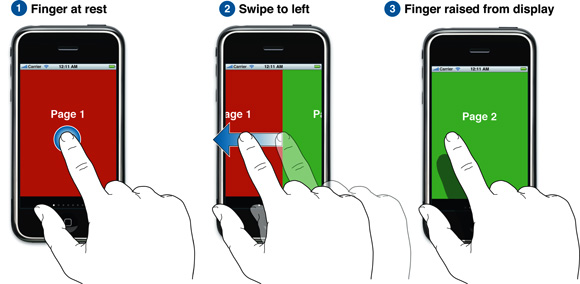
圖片來自於Apple Developer
在Unity內的2D UI實現如同Paging一樣的頁面滑動切換,需要使用到NGUI。
主要有三個Component要用:

稍微調整一下panel的大小就可以使用了!
訂閱:
文章 (Atom)